Commands

Know what a command does to your project.

Use spectra below if you installed the native binary. Otherwise use ./.spectra/bin/spectra from the project root.

What each command changes

Paths are relative to your project. Writes include caches and approval/eval records. Native users run spectra. Npm users run ./.spectra/bin/spectra. A failed check of release readiness may still refresh reports.

CommandPurposeProject effect
spectra initBootstrap a new projectCreates .spectra/bin/, .spectra/cli/ for the Node fallback, .spectra/sdd/, .spectra/docs/spectra/, .spectra/docs/<project-name>/, .spectra/config.yaml and .spectra/install.json. Local mode updates Git’s shared info/exclude file
spectra adoptAdd Spectra to an existing codebaseInstalls the same layer as init. Additionally writes .spectra/cache/index/repo-index.json, .spectra/sdd/memory-bank/discovery/*.md, the technical module map and .spectra/sdd/adoption/{current-state.summary,gap-analysis,review-queue}.yaml
spectra onboardCapture project intent from your answersInteractive runs write .spectra/sdd/memory-bank/core/projectbrief.md
spectra contextLoad focused context before planning, implementation or reviewCreates or refreshes .spectra/cache/context/*.summary.json. Spectra does not edit canonical source documents
spectra taskRecord intent before implementationOverwrites .spectra/sdd/memory-bank/core/implementation-brief.md with the supplied item, goal and template sections
spectra routeSelect relevant technical modules and business domainsDoes not write project files
spectra knowledgeRecord durable business rules and manage their lifecycleUpdates .spectra/sdd/memory-bank/business/INDEX.md and domain rules.md / unresolved.md
spectra indexRefresh evidence after bootstrap or manifest changesDefault mode writes .spectra/cache/index/repo-index.json
spectra inspectShow what a rule, requirement, module or test target relates to, and why it is verified or not. Or show what changed files impactDoes not write project files. May rebuild the disposable Knowledge Map cache
spectra checkValidate the Spectra layer after changesDoes not write persistent project files. Validation smoke checks use temporary directories
spectra verifyAssess release readiness before handoffRefreshes .spectra/sdd/governance/approval-state.yaml and intake approval status. Runs release evals and overwrites each selected feature’s evals/reports/latest.json and latest.md
spectra statusResume work and see recent changesRecomputes .spectra/sdd/governance/approval-state.yaml and syncs approval status in .spectra/sdd/memory-bank/core/intake-state.md
spectra updateUpdate application softwareUpdates a verified managed native installation. Other provenances receive package-manager or installation guidance. Spectra does not read or write project files
spectra migrateMigrate one project's layout or schema--check is read-only. An explicit migration changes only the selected project and validates it
spectra uninstallRemove the managed native applicationRemoves verified machine-owned versions and command. Never accesses project files
spectra doctorInspect local tools, runtime and adapter healthWithout --fix: does not write project files
spectra approveAdvance the staged approval lifecycleUpdates .spectra/sdd/governance/approval-state.yaml with stage/baseline/timestamp and syncs .spectra/sdd/memory-bank/core/intake-state.md. Release approval also writes eval reports
spectra evalEvaluate feature contracts or configured application behaviorOverwrites .spectra/sdd/features/<feature>/evals/reports/latest.json and latest.md
spectra diffUnderstand specification changes and approval impactinit and update initialize/append .spectra/sdd/memory-bank/core/spec-diff.md by default
spectra quickRun a focused docs/rules/spec/ops validation laneDoes not write persistent project files. Validation uses temporary smoke projects
spectra skillsResolve skill execution order for a taskDoes not write project files
spectra adaptersGenerate instructions for the AI tools you useWrites required root/tool files in the target: AGENTS.md, CLAUDE.md, .github/copilot-instructions.md, .cursor/rules/, .windsurf/rules/ or .agent/rules/
spectra versionConfirm the installed executable versionDoes not write project files
spectra helpDiscover commands and their optionsDoes not write project files

Read the complete CLI Reference for prerequisites, modes, repeat behavior and before/after file trees. All normal command forms are top-level. Older aliases remain compatibility entrypoints.

Example: indexing your project

Before: .spectra/cache/index/repo-index.json absent or stale
spectra index
After:  .spectra/cache/index/repo-index.json contains current evidence
spectra index --check
After:  no project file changes; freshness status printed

Explained workflow

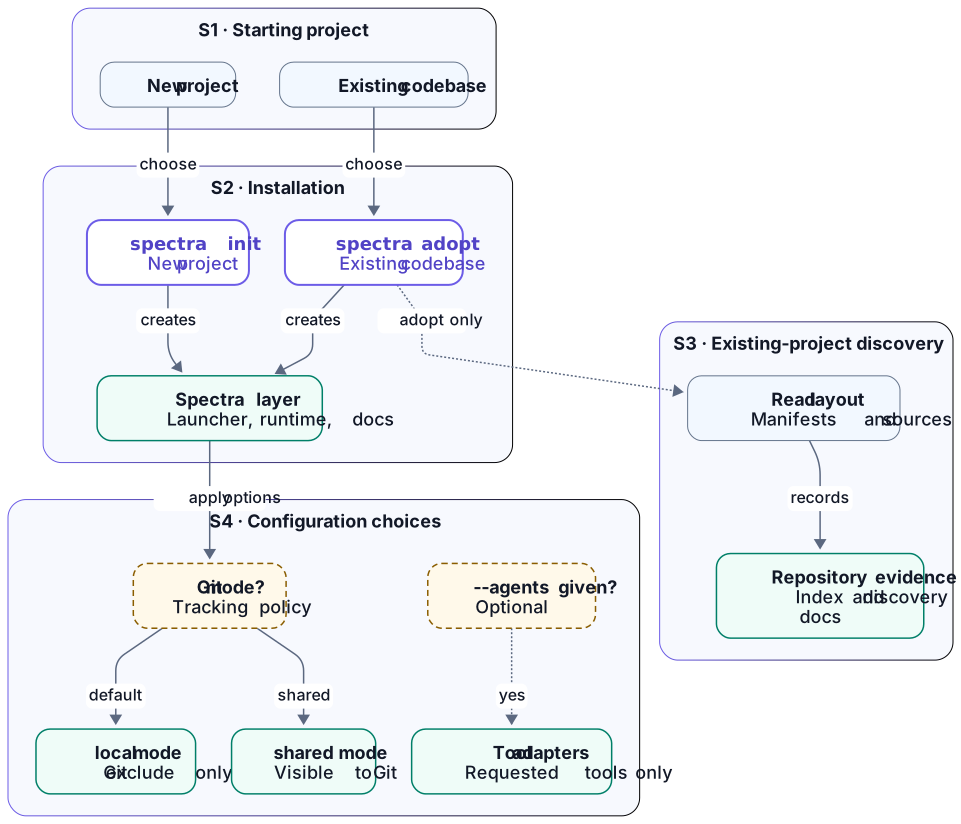
Setup: from your project to the installed Spectra layer

Choose a starting command, see the common installation, then follow the adopt-only discovery and configuration branches. Arrows to results describe effects. They do not ask you to run another command.

Read the detailed group explanations below the diagram.

Setup: from your project to the installed Spectra layer. Groups are explained in the cards immediately below.
Read the diagram with the matching group cards below. Open full-size setup diagram. The full flow is visible vertically. On narrow screens, focus the diagram and use left/right arrow keys, or swipe horizontally.

S1 · Starting project

Command / When to use
init bootstraps a new project. adopt adds Spectra to an existing codebase and records repository observations.
Prerequisites
An installed Spectra CLI. Default local mode requires a Git worktree. Run from the target project or pass its path.
Reads
Both commands inspect installation metadata and packaged templates. Adoption additionally reads application manifests and the source layout.

spectra init reference · spectra adopt reference

S2 · Installation

What Spectra does
Installs the project-local Spectra layer. Native users can run spectra. The local launcher remains available at ./.spectra/bin/spectra.
Writes / Project result
  • .spectra/bin/Project-local launcher.
  • .spectra/cli/Local CLI for the Node fallback, when needed.
  • .spectra/sdd/System runtime, memory templates and feature contracts.
  • .spectra/docs/spectra/Guides shipped with Spectra.
  • .spectra/docs/<project-name>/Area for project-generated documents. Plugins use their own subdirectories.
  • .spectra/config.yamlProject configuration.
  • .spectra/install.jsonInstallation and ownership metadata.
Conditions and preservation
Spectra copies existing user memory only when it is missing. The project docs area provides an output location. Installation does not execute plugins or create their plans. Existing foreign adapters cause refusal before installation.

spectra init reference · spectra adopt reference

S3 · Existing-project discovery

What Spectra does
adopt records evidence from the existing codebase. It does not execute manifest test commands or infer confirmed business responsibilities.
Writes / Project result
  • .spectra/cache/index/repo-index.jsonRepository evidence index.
  • .spectra/sdd/memory-bank/discovery/*.mdRepository observations.
  • .spectra/sdd/memory-bank/tech/modules.mdUnconfirmed technical module map.
  • .spectra/sdd/adoption/current-state.summary.yamlCurrent-state summary.
  • .spectra/sdd/adoption/gap-analysis.yamlGaps requiring attention.
  • .spectra/sdd/adoption/review-queue.yamlFindings for human review.
Conditions and preservation
This is an adopt-only result. Findings need review before becoming confirmed project knowledge. Re-adoption regenerates discovery evidence. Spectra reports an indexing failure. Shell discovery stays available.

spectra adopt reference

S4 · Configuration choices

Git mode
--git-mode local is the default. It adds the local Spectra exclusion to the Git info/exclude file. It does not change .gitignore. --git-mode shared keeps the generated state visible to Git. Git does not stage or commit it.
Optional adapters
--agents <csv> generates instructions only for requested tools. Required locations include AGENTS.md, CLAUDE.md, .github/copilot-instructions.md, .cursor/rules/, .windsurf/rules/ and .agent/rules/.
Conditions and preservation
Adapter files follow each tool’s required path. Use spectra adapters deliberately to regenerate existing Spectra instructions. Check ownership before replacing files.

spectra init reference · spectra adopt reference · spectra adapters reference

Explained workflow

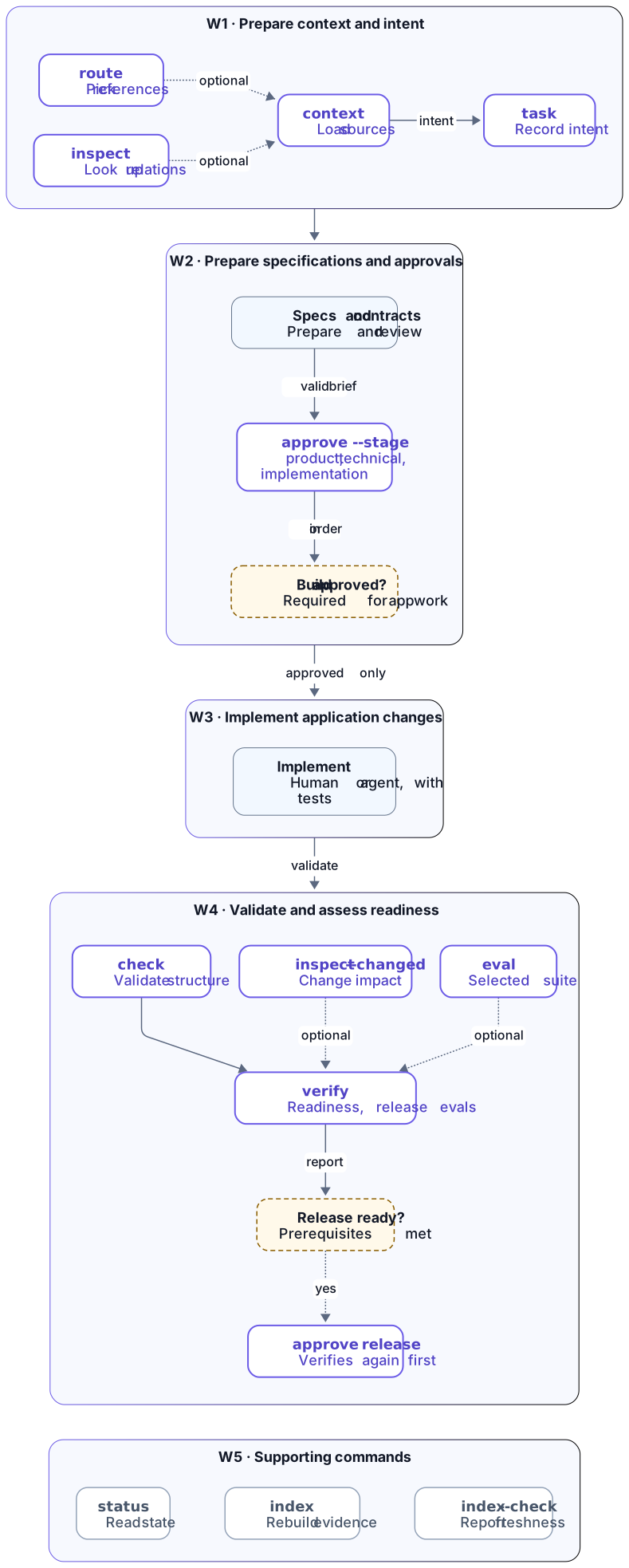
Daily work: preparation, approval conditions and readiness

This is a recommended workflow. Preparation and specification work are separate from application implementation. The application-work approval gate is explicit. The diagram shows optional evaluation and supporting commands separately.

Read the detailed group explanations below the diagram.

Daily work: preparation, approval conditions and readiness. Groups are explained in the cards immediately below.
Read the diagram with the matching group cards below. Open full-size workflow diagram. The full flow is visible vertically. On narrow screens, focus the diagram and use left/right arrow keys, or swipe horizontally.

W1 · Prepare context and intent

Command / When to use
Use these commands as you need them. route selects the relevant technical modules and business domains. context loads focused sources. inspect <id> shows what a rule, requirement, module or test target relates to. task records the implementation intent.
Reads
Canonical project sources, routing indexes, role/goal configuration and optional cached repository evidence.
Writes / Project result
  • .spectra/cache/context/*.summary.jsonContext refreshes summary caches. Canonical source documents remain unchanged.
  • .spectra/sdd/memory-bank/core/implementation-brief.mdTask replaces the brief with the supplied item and goal.
Conditions
Route and inspect do not write project files (inspect may rebuild the disposable Knowledge Map cache) and are optional. Context and task do not implement application features. This diagram is a recommended workflow, not a requirement to run every command.

spectra route reference · spectra context reference · spectra task reference

W2 · Prepare specifications and approvals

Human / agent work
Prepare and review the product intent, technical specifications and contracts with your development tools. Spectra records approval state. It does not write your implementation.
Required stage order
product-approved → technical-approved → implementation-approved. Each stage requires its prerequisites and a valid preceding stage. Product approval also requires a meaningful project brief.
Writes / Project result
  • .spectra/sdd/governance/approval-state.yamlApproval stage, commit baseline, timestamp and computed validity.
  • .spectra/sdd/memory-bank/core/intake-state.mdSynchronized approval status.
Conditions and failed requests
App work requires valid implementation approval. Changes can invalidate an earlier approval. A recorded stage alone is insufficient. A failed approval request may still recompute validity and synchronize status.

spectra approve reference · spectra diff reference

W3 · Implement application changes

Human / agent work
After valid implementation approval, use your own tools to change application code and run the project’s build and tests.
Project result
Application files change according to that work. Humans, agents or configured application commands make these changes. The context, task and approval commands do not.
Conditions
The diagram’s approval checkpoint describes the application-work gate. You can prepare specification-only work before that gate.

spectra approve reference · spectra check reference

W4 · Validate and assess readiness

Command / When to use
check validates the Spectra structure and policy. inspect --changed (or --base <ref>) shows the change impact of your edits. It uses the same rules as verify --gate review. eval runs the selected suite when you need it. verify assesses readiness and runs the release evals itself. You do not need to run eval first.
Reads
Contracts, policy inputs, approval validity, feature eval definitions, readiness checklists, review evidence and repository index freshness.
Writes / Project result
  • .spectra/sdd/governance/approval-state.yamlVerify recomputes validity.
  • .spectra/sdd/memory-bank/core/intake-state.mdVerify synchronizes approval status.
  • .spectra/sdd/features/<feature>/evals/reports/latest.jsonLatest selected-suite or release-eval report.
  • .spectra/sdd/features/<feature>/evals/reports/latest.mdReadable version of the latest report.
Conditions and failed runs
Check does not write persistent project files. Smoke checks use temporary directories. A failed verify can still refresh state and reports. In command-mode eval, configured setup/scenario commands run from the project root and may modify their chosen paths. Check and verify do not automatically run your generic npm/Maven test command.
Final release approval
Request approve --stage release-approved when the readiness and release prerequisites are met. This command runs verification again before recording approval, so release approval attempts can also write eval reports.

spectra check reference · spectra eval reference · spectra verify reference · spectra approve reference

W5 · Supporting commands

Status
spectra status reads Git state, installation metadata and resume memory. It does not write project files or update progress for you.
Repository index
spectra index rebuilds .spectra/cache/index/repo-index.json. It reads manifests and source/test layout without executing build or test commands.
Freshness check
spectra index --check reports missing, stale or fresh evidence without writing project files. Missing or stale evidence returns a failure.
Conditions
Use these commands when resuming work or when repository evidence needs attention. They are supporting actions, not mandatory links in the main workflow.

spectra status reference · spectra index reference

Explained workflow

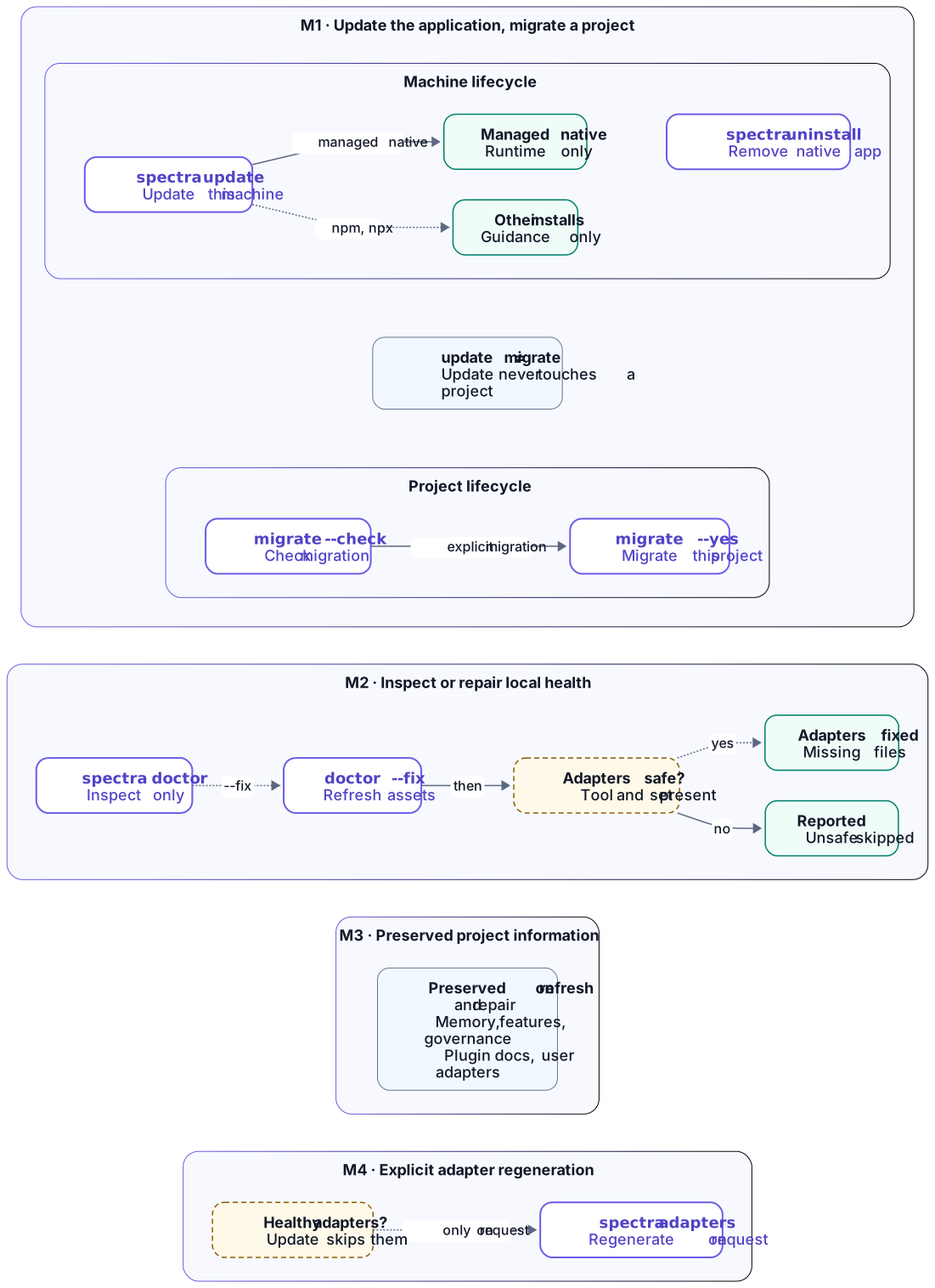
Maintenance: update, diagnosis, repair and preservation

Updating the application, migrating a project and doctor are separate paths: update never reads or changes a project. Compare their conditions and effects, then read the preservation boundary. The boundary describes what stays intact, not an extra step to execute.

Read the detailed group explanations below the diagram.

Maintenance: update, diagnosis, repair and preservation. Groups are explained in the cards immediately below.
Read the diagram with the matching group cards below. Open full-size maintenance diagram. The full flow is visible vertically. On narrow screens, focus the diagram and use left/right arrow keys, or swipe horizontally.

M1 · Update the application, migrate a project

Command / When to use
spectra update updates the Spectra application installed on this machine. spectra migrate checks or migrates the older layout or schema of one project. Neither runs implicitly: update never migrates a project, and nothing migrates silently.
Reads
update reads the published version and the installation source. The lookup of the latest version needs network access. migrate reads the project's layout markers and install metadata.
What Spectra does
A verified managed native install updates its machine runtime and command. For a global npm install, Spectra prints the npm install -g spectra-pack@latest command. Spectra does not replace npx, project-local fallback or development installs. migrate --check shows the required steps and writes nothing. migrate --yes first makes a recovery snapshot. Then it migrates only the selected project.
Writes / Project result
  • machine runtime and commandUpdated by update for a managed native install. The command does not touch any project file.
  • .spectra/Changed only by an explicit migrate --yes on that project.
Conditions and preservation
spectra uninstall --yes removes verified native files and leaves every project unchanged. A derived cache such as the Knowledge Map rebuilds on its own and never requires migrate.

spectra update reference · spectra migrate reference

M2 · Inspect or repair local health

Command / When to use
spectra doctor reports tool, runtime, launcher and adapter health without writing project files. spectra doctor --fix additionally repairs generated project assets.
Writes / Project result with --fix
  • .spectra/sdd/system/Regenerated runtime.
  • .spectra/docs/spectra/Refreshed owned guides.
  • .spectra/bin/ and .spectra/cli/Local launcher and Node fallback.
  • .spectra/install.jsonRepaired metadata.
  • Git info/excludeLocal exclusion policy, when applicable.
Conditional adapter repair
Doctor repairs a detected adapter set with missing files only if the required tool CLI is available and no sibling file belongs to the user. Currently the Codex adapter requires the Codex CLI. Unconfigured tools are not automatically set up. Spectra skips unsafe sets. It reports the remaining unhealthy state and manual problems.
Difference from update
Doctor repairs the local project layer. It does not perform update’s published-version lookup and global CLI self-update. Repeated fixes refresh generated files without claiming user-owned documents.

spectra doctor reference

M3 · Preserved project information

Preservation boundary
This area applies to refresh and repair. It is not a subsequent workflow step or a newly generated output.
Kept information
  • .spectra/sdd/memory-bank/Existing project intent, core memory and business knowledge.
  • .spectra/sdd/features/ and .spectra/sdd/governance/Existing feature and governance state.
  • .spectra/docs/<project-name>/<plugin>/Project-generated plugin documents.
  • Unowned guide collisions and user adapter filesRemain outside automatic overwrite ownership.
Conditions
Healthy existing adapters are not automatically regenerated by update. Doctor repairs only detected sets that meet tool prerequisites. User-owned siblings make automatic repair unsafe.

spectra update reference · spectra doctor reference

M4 · Explicit adapter regeneration

Separate user action
spectra adapters --agents <csv> deliberately regenerates Spectra instructions for selected tools. It is not an automatic update step.
Writes / Project result
Requested root/tool paths, such as CLAUDE.md or .cursor/rules/. Same-project local mode also updates installation ownership metadata and Git’s local exclude policy.
Conditions and preservation
Inspect existing instructions before deliberate regeneration. The command replaces selected Spectra projections. It does not move plugin documents or run a plugin.

spectra adapters reference